Posts

crx-hotreload: a great tool for chrome addon autorefresh

Let me be lazy today and relay some good work made by a Moscow based SW developer named Vitaly Gordon. That fellow has published an autorefresh javascript snippet which improves extension development productivity by a signifcant factor. In dev mode, edit and save one of your build files and your browser will automatically reload the extension and the current active tab ... neat! Comparing to other solutions I've found on the net, this one is very elegant since it does not require any change to your build process, just inclusion of a snippet in your manifest. Code can be found on git. Thanks Vitaly!
chrome and crx files : what the heck ?

Crx format is a zip  archive format with a special header (more details here ) used for chrome addon packaging (quite similar to .xpi files fr Firefox). But used for what ? Initially, it was a nice way for exchanging addons among people especially in the dev phase. But ...  Google people have now forbidden the installation of addons from local files (you got to use the store!). Various sources suggest using a less restrictive version of Chrome like Canary or dev version but as of today those versions present the same symptom. So what ? well go back to the source ie chromium project, download a version from  https://www.chromium.org/getting-involved/download-chromium .

Building a chrome devtool extension

Image
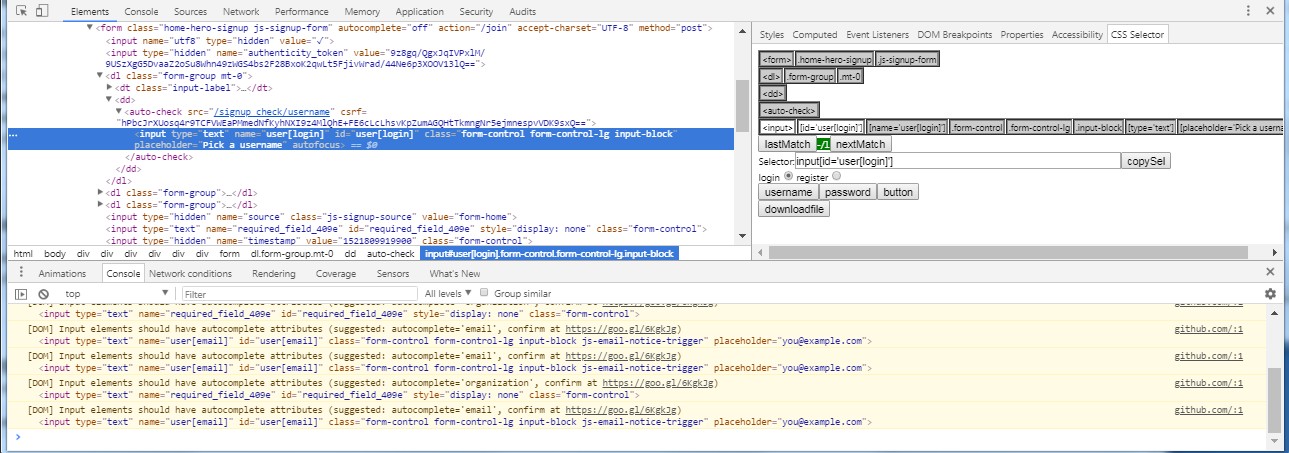
Use case: I had recently a new requirement for a utility chrome extension to help with building the most appropriate CSS selector for a given DOM element. I was initially thinking about the regular extension architecture including a sidebar before going for a little exploration on the google store. I ended up inspiring myself from an existing extension called  CSS Selector Helper for Chrome™  which does a very similar job at the cost of  less than 300 lines of lines of javascript ! I was able to adapt it to my needs in a few days (including a complete code refactoring and a migration to reactjs) How to use the extension: - addon creates a sidebar in the devtools space accessible via inspect/elements/css selector. You'll access it from the devtools panel (elements and then css selector in the right pane menu) - selects a DOM element using the inspector feature - addon displays a limited DOM hierarchy with selected attributes for each node level. - a couple of simp...

Which instrumentation js library for gmail extensions

There are many addons flying around around gmail (gmass, boomerang etc ..). There will be plenty more with the growing usage of this client. The main question for gmail addon designers is about selecting the appropriate instrumentation method. I fell in the trap a few years ago trying to mess around with the gmail page. I arrogantly threw myself in reverse engineering the gmail page (one of the most complex SPA ever written). Don't do this ... unless you love sudokus and absolutely don't care about project deadlines. I am aware of two instrumentation libraries in the field which greatly ease the job at inserting buttons at the desired standard locations and setting event handlers for getting into the gmail event flow: gmail.js ( https://github.com/KartikTalwar/gmail.js ) inboxSDK ( https://www.inboxsdk.com/ ) I'd recommend inboxSDK  since it is a maintained and well documented library.

On-the-fly javascript interception : solving the sandbox problem.

Use case: Should your extension require to interact with the current page in a very intimate fashion (and there are opportunities for this...) ,  you may encounter the roadblock of the javascript sandboxing: javascript code and data are confined in different contexts. Your content script will therefore not be able to access the JS legitimately imported by the page. Solution: In order to gain access and interact with the data and code available in the page, the solution is to insert a proxy javascript snippet in the page. But you can't do this by simply adding a script tag. Instead, you will need to: Design a proxy script based on a window event listener Identify the script you need to deal with (using browser debugging tools such as chrome devtools)  Intercept the targetted script at load time and modify it. Send commands thru event messages to your proxy which HAVE access. Implementation: 1/ Proxy var proxyCode  = `window.addEventListener('message',...

Any chance to get my extension known out there ? a few numbers from the chrome web store...

Many extensions developers wonder about the methods to reach their customers. Posting an extension on the chrome store and relying on spontaneous user acquisition from there is almost as efficient as throwing a bottle in the ocean... Indeed and as of mid 2017, if you post a new extension on the chrome store, it will be part of the 56K+ already existing extensions. Good luck: Category          Total Accessibility 5071 Blogging 940 BY google 64 Dev tools 5369 News & weather 1860 Photos 1323 Productivity 18914 Search tools 3205 Shopping 2633 Social & communications 7061 Sports 833 Fun 9655 Total 56928 EDIT: Since date this article was orignally published, there have been a couple of initiatives to distribute more precise data about the subject. You'll find here and here two very interesting reports by Will...

Best npm and javascript libraries for extensions

Javascript libraries jquery, jquery-ui : well-known DOM manipulation functions and widgets. Don't forget to include minified version in your addon structure ! materialize, bootstrap: adopt a standard look&feel for your addons. underscore:widely used library to manipulate collections and arrays. Streamline your code ! TLD: url analysis library, allows to dissect urls and separate the various components of a url. NPM modules Despite the fact that most js libraries can be webified for internal addon usage, I mainly use npm modules for my build environment:  after testing grunt, I've adopted gulp for the readability and compactness of the build scripts. I have validated and I'm using the following modules on a daily basis: gulp-vinyl-zip: package all addon files into a single zip file for Chrome store advertisement. crx : package all addon files into a crx file for Chrome firefox-xpi: to package all addon files into a single xpi file for AMO store a...