Posts

Showing posts with the label chrome

Migrating to manifest v3

This post is not a migration guide. Google has published one here . The goal is to raise awareness among extension owners. The idea is to understand the impacts and the efforts required. Are you concerned ?  Well, as of Jan 2022, you can't post a manifest v2 based extension on the Chrome Web Store (CWS) and by end of 2022, all extensions should have been migrated. Official Google timeline is here . So the question is more about the severity of changes you need to bring in and when you need to start the efforts. This depends on: - the complexity of your addon, its architecture and the balance of responsibilities between content and background scripts - the amount of chrome APIs deprecated in V3 - the usage of chrome APIs that are not available or not ready yet in V3. - the usage of DOM based APIs  Note: you can still distribute V2 extensions till June 2023 if you don't host your extension on CWS and force deployment thru Google Enterprise policy. Service workers Architecture is...


Workarounding the "remote code execution" constraint

Firefox has done it before Chrome some time ago: most addons evaluating Javascript code which is not included in the addon package will get a very hard time from Firefox reviewers. Currently, it is still possible with Chromium based browsers. However and webstore-wise there is a strong chance for your addon to stay significantly longer in the "pending review" status  (weeks?) if the review system detects any sign or evidence of remote code execution. With the arrival of manifest V3 (currently under development) , calls to eval("jscode") , new Function("jscode") and chrome.tabs.executeScript({code: "jscode")) won't work anymore. Let's face it, there is no solution to this problem and this will impact all the scripting addons, among them the famous TamperMonkey with 10M+ users... but you can still benefit of the JS syntax and (partially) workaround those limitations in certain situations. Here is how...  What if you used a sandboxed js inte...

My extension got rejected (by the Chrome Web Store) !

Registering and updating chrome extensions  on the Chrome Web Store has become quite a headache since June 2018. Causes for rejection have obviously evolved in the past year and  Google people are far from eager to provide the changes, this on purpose. Even worse some of the existing extensions get ousted  from the store with obscure reasons, leaving thousands of users in the dark. Without betraying much of the secrets here is a list of questions you should consider before submitting a new package based on my experience: A/ My extension is installed since years, undergone tens of upgrades and suddenly gets rejected ?? answer: review rules have changed, it has nothing to do with the little or big changes you have brought with the new version. Stop scratching your head and audit your addon based on the new rules. B/ Got the rejection message “Spam and Placement in the Store” answer:  there are a few reasons for that and you should review: in your manifest ...

Code coverage and chrome extensions

Image
I'm particularly interested in code coverage assessment in two situations: - who has never refactored a functional extension to cope for growth and new features ? When I refactor, I do variable renaming, object restructuring, code cleaning etc .., and I become very concerned about regression issues. Changes can be spread,major and devastating. So, I need to validate 100% of them. - having deployed tens of extensions, I very often start new projects from existing ones and carry over code I may not need at the end. Code coverage highlights very quickly candidate files and lines to prune off. Since 59, chrome offers a very interesting code coverage feature available thru the devtools - of course -.  Content script and background scripts (in fact all scripts!) can be studied for coverage. So open the devtools, open the console and click the "coverage" tab: - a "content scripts" checkbox next to the URL filter allows to include content scripts in the cove...

Intercepting file download in chrome

Here is a little JS snippet which prevents every file download  (and accessorily opens a new tab in Gsuite for attempts to download from the Gsuite):   chrome.downloads.onCreated.addListener(downloadItem => {       chrome.downloads.cancel( downloadItem.id, ()=>{         alert("DL canceled: "+downloadItem.finalUrl);         if (downloadItem.finalUrl.search("https://docs.google.com")!=-1){           var _driveUrl = downloadItem.finalUrl.replace(/export\?.*/,"");           chrome.tabs.create({url:_driveUrl}, ()=>{});         }       })   });

Filtering console messages in the chrome devtools window

Image
I was disappointed to see that the regexp '.*' filter button had disapeared starting from a given chrome version (I can't remember the exact one). In fact you still have this ability by entering a '/' surrounded expression in the filter field. As an example, if you want to remove all logs containing either badword1 or badword2 or badword3 : /^((?!badword1|badword2|badword3).)*$/ Try it!

Localizing your extension html pages in a snap!

Here is an astute method I got from Vitaly a colleague I worked with a few years ago for easily and quickly localizing your html files. It relies on jquery, the i18 chrome API and the corresponding dictionnary built in your extension package. 1/ Copy paste the following jquery code into a file you'll name translate.js $($=> { $('[translate]').each((i, elem)=> { let $elem = $(elem); $elem.text(chrome.i18n.getMessage($elem.text())); }); }); 2/ edit each and every html page of your extension: add a "translate" attribute to all elements requiring translation like: <span translate>theStringToTranslate</span> include the above translate.js in your page. Voila ... !

crx-hotreload: a great tool for chrome addon autorefresh

Let me be lazy today and relay some good work made by a Moscow based SW developer named Vitaly Gordon. That fellow has published an autorefresh javascript snippet which improves extension development productivity by a signifcant factor. In dev mode, edit and save one of your build files and your browser will automatically reload the extension and the current active tab ... neat! Comparing to other solutions I've found on the net, this one is very elegant since it does not require any change to your build process, just inclusion of a snippet in your manifest. Code can be found on git. Thanks Vitaly!

chrome and crx files : what the heck ?

Crx format is a zip  archive format with a special header (more details here ) used for chrome addon packaging (quite similar to .xpi files fr Firefox). But used for what ? Initially, it was a nice way for exchanging addons among people especially in the dev phase. But ...  Google people have now forbidden the installation of addons from local files (you got to use the store!). Various sources suggest using a less restrictive version of Chrome like Canary or dev version but as of today those versions present the same symptom. So what ? well go back to the source ie chromium project, download a version from  https://www.chromium.org/getting-involved/download-chromium .

Building a chrome devtool extension

Image
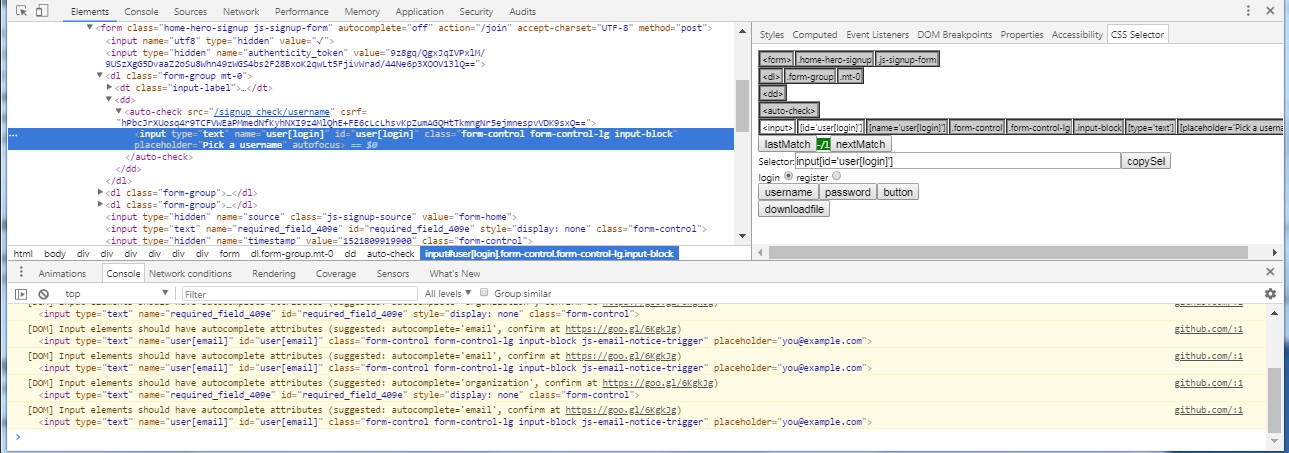
Use case: I had recently a new requirement for a utility chrome extension to help with building the most appropriate CSS selector for a given DOM element. I was initially thinking about the regular extension architecture including a sidebar before going for a little exploration on the google store. I ended up inspiring myself from an existing extension called  CSS Selector Helper for Chrome™  which does a very similar job at the cost of  less than 300 lines of lines of javascript ! I was able to adapt it to my needs in a few days (including a complete code refactoring and a migration to reactjs) How to use the extension: - addon creates a sidebar in the devtools space accessible via inspect/elements/css selector. You'll access it from the devtools panel (elements and then css selector in the right pane menu) - selects a DOM element using the inspector feature - addon displays a limited DOM hierarchy with selected attributes for each node level. - a couple of simp...

Any chance to get my extension known out there ? a few numbers from the chrome web store...

Many extensions developers wonder about the methods to reach their customers. Posting an extension on the chrome store and relying on spontaneous user acquisition from there is almost as efficient as throwing a bottle in the ocean... Indeed and as of mid 2017, if you post a new extension on the chrome store, it will be part of the 56K+ already existing extensions. Good luck: Category          Total Accessibility 5071 Blogging 940 BY google 64 Dev tools 5369 News & weather 1860 Photos 1323 Productivity 18914 Search tools 3205 Shopping 2633 Social & communications 7061 Sports 833 Fun 9655 Total 56928 EDIT: Since date this article was orignally published, there have been a couple of initiatives to distribute more precise data about the subject. You'll find here and here two very interesting reports by Will...

WebExtensions : the converged future of browser addons

Firefox since FF48 is now proposing the Webextension API which allow to reuse chrome code and APIs with little changes making chrome addons code "99% compatible" with Firefox. Note that Edge the last Windows browser also accepts chrome-like APIs. Hints: - there are a couple of modifications that still need to be brought to the chrome addon repo to make them totally usable in the Firefox context: 1/ locales 2/ manifest.json 2.1 gecko id This one is required by the AMO website to allow registration. Firefox contrary to Chome uses a string id to uniquely identify an addon. 2.2 gecko update_url Don't forget to set this property if you don't host your addon on the AMO site ! 2.3 web_available_resources The chrome manifest file admits wildcards for making resource available, this is not the case for Firefox where you have to explicit mention file names. 3/ some APIs like "notifications" claimed as supported by Firefox...